












Start now TOGGLE MENU

portatour® Mobile field sales force app

Mobile portatour® Appvergrößern

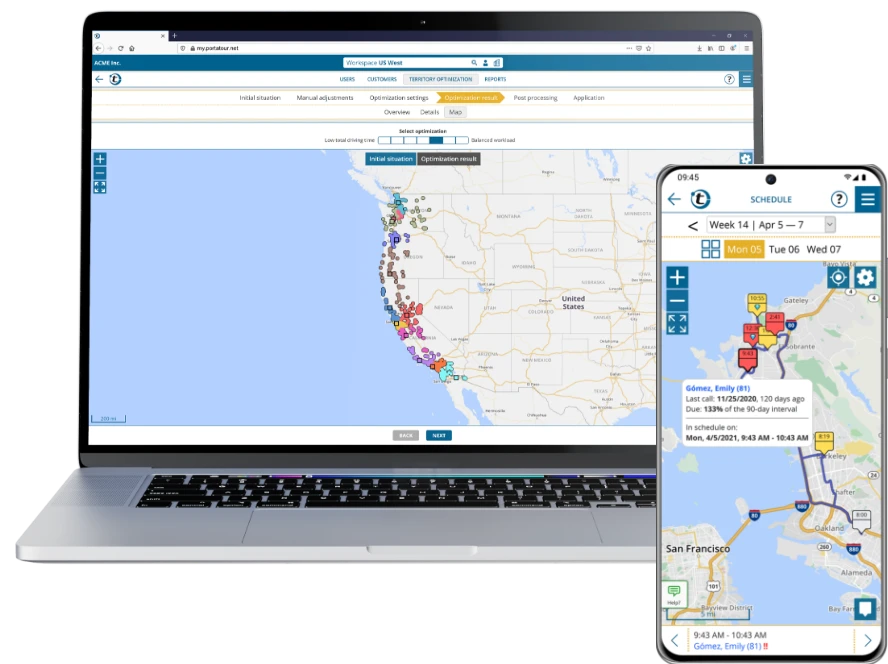
With the portatour® App, you get the maximum out of your working day in the field. Automatic route planning, intelligent territory planning and fewer empty miles – directly on your smartphone, tablet or notebook. This way, you visit more customers with less driving time and noticeably increase your efficiency.

Get started now and put your field sales force on the road to success with the portatour® App.

Our customers

Find out more about our customers

Route Planner

Optimize routes with portatour® Route Planner

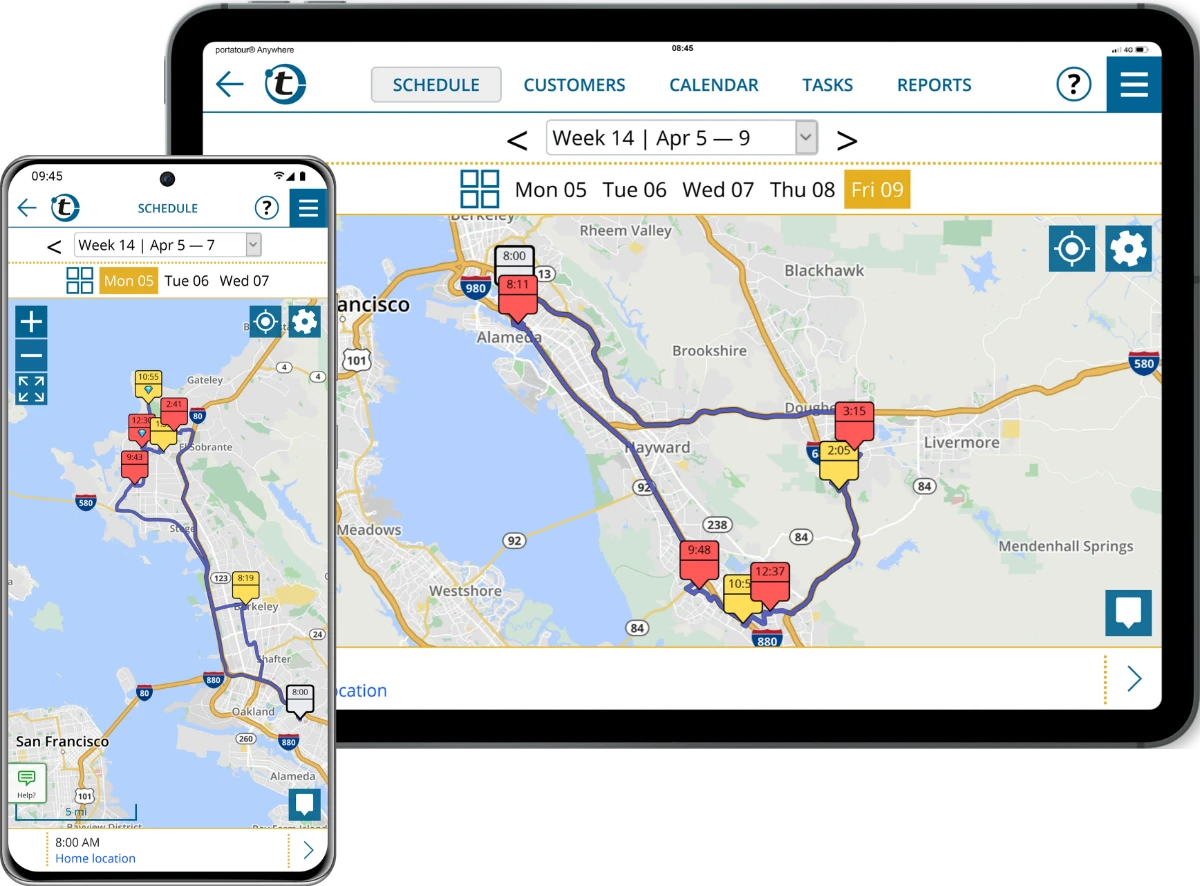
With portatour® Route Planner, you plan your customer calls directly on your mobile device not only automatically, but also dynamically. The app adjusts your route in real time - for shorter travel distances, more appointments per day and maximized efficiency in the field.

More details about the sales route planner

Territory Optimization

Manage sales territories with portatour® Territory Optimization

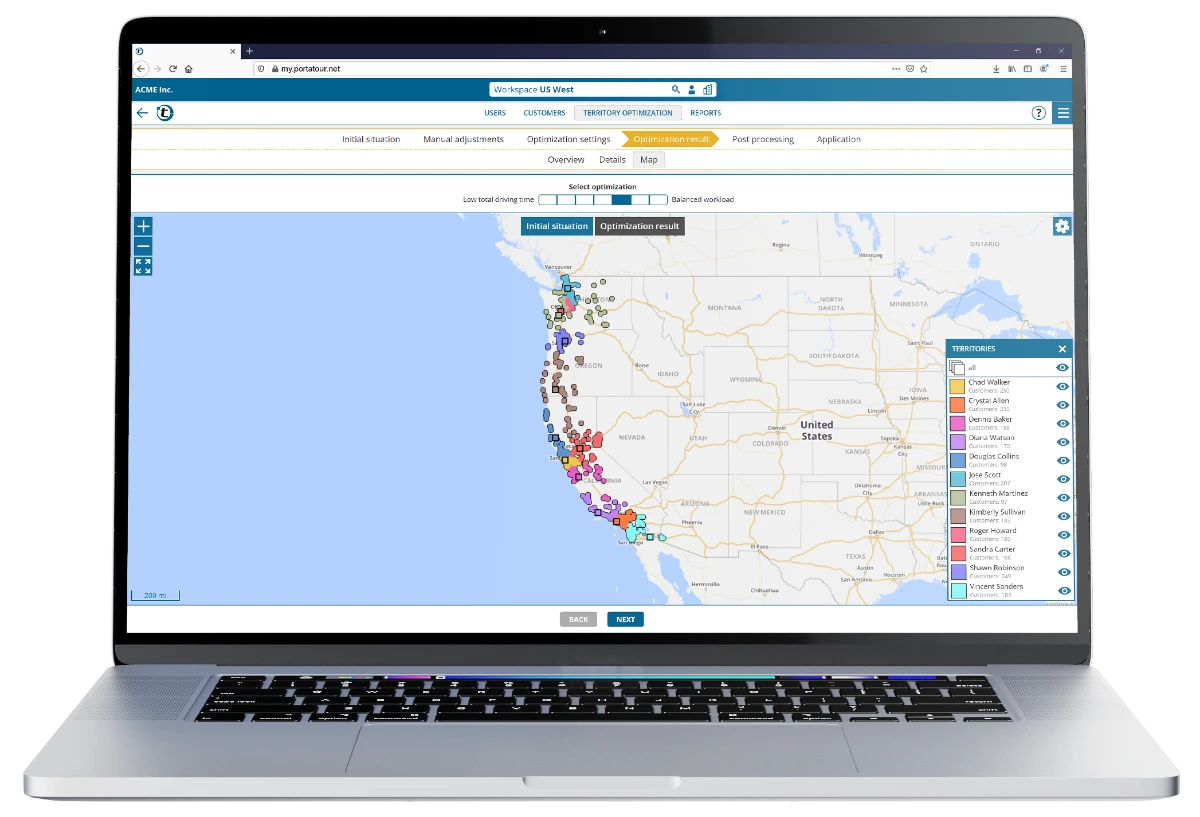
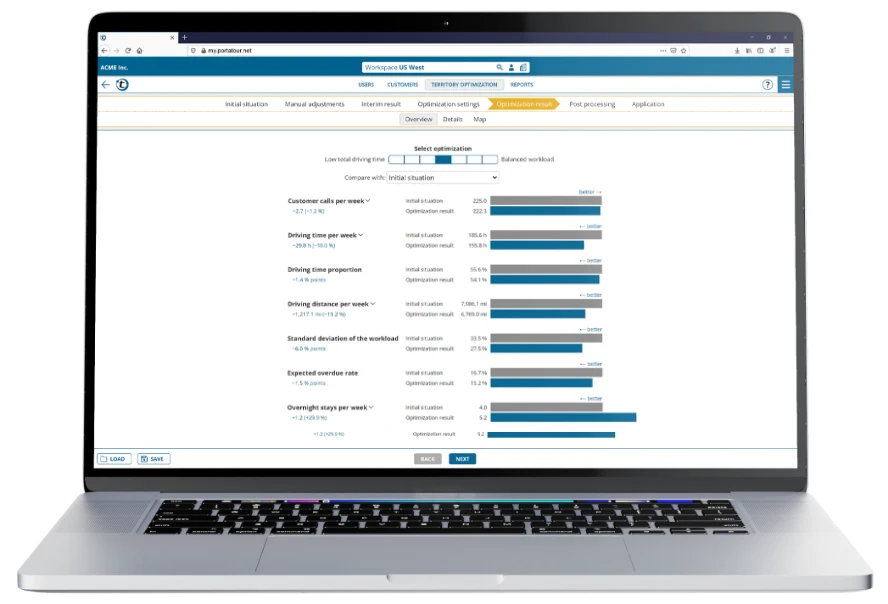
With the territory planning solution portatour® Territory Optimization, you plan and optimize your territories in no time. Create different territory scenarios based on real data and choose the most efficient division for your sales territory.

More details on territory optimization

What are the advantages of the portatour® field sales force app?

portatour® is your comprehensive field sales force app for automatic route planning and dynamic territory planning.

18 % fewer kilometers
20 % more customer calls

Which features does the portatour® App have?

Automatic route planning

Besuchsplanung mit der portatour App®vergrößern

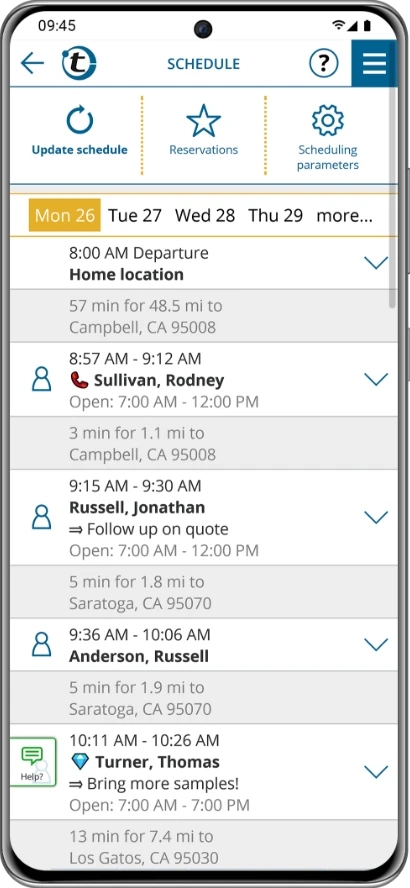
portatour® calculates the best route for your customer calls at the touch of a button - based on appointments, call intervals, business hours, geographical data and current traffic information. Automatically create daily, weekly and monthly reports on visited customers.

More information about portatour® Route Planner

Territory planning & scenario comparison

Gebietsoptimierung mit der portatour® Appvergrößern

Create different territory divisions and simulate how changes affect visit frequency and driving times.

More information about portatour® Territory Optimization

CRM integration

portatour® App CRM-Integrationen

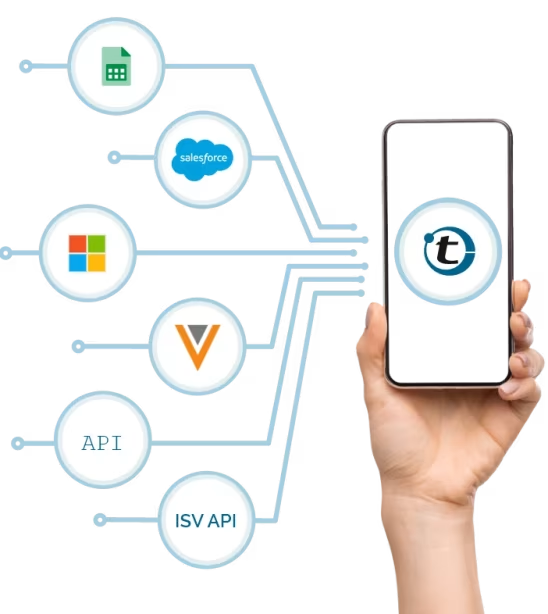
Connection to leading CRM systems such as Salesforce, Microsoft Dynamics or Veeva CRM, support for manual import (Excel/CSV), integration with additional CRM/ERP systems as well as via the portatour® API/ISV API for seamless data synchronization.

More information about integrations

portatour® App CRM-Integrationen

Platform-independent offline use

Offline-Nutzung der poratour® Appvergrößern

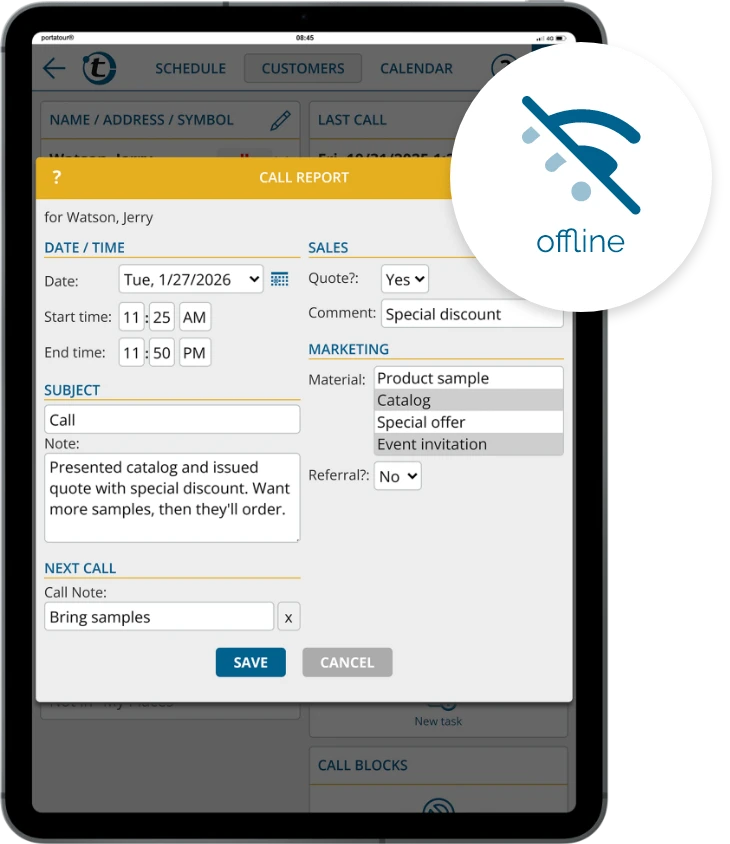
Even without an internet connection, you can access planned routes and record visit data - synchronization takes place at the next connection.


Start now!

And convince yourself of our solutions for your field sales force.

How do I use the portatour® app on my device?

portatour® Web App

portatour® Web App

Whether Android, iOS, Windows, Mac or Linux device: The field sales force app from portatour® can be used as a web app on any device.

Advantages

  • Usable on any mobile device
  • No app download + no installation required
  • Low storage space consumption
  • You do not have to worry about any updates

To access portatour without an app download on your smartphone, tablet or notebook even faster and more conveniently, add the portatour® icon to your home screen.

portatour® Web App

portatour® Android App

portatour® Android App im Google Play Storevergrößern

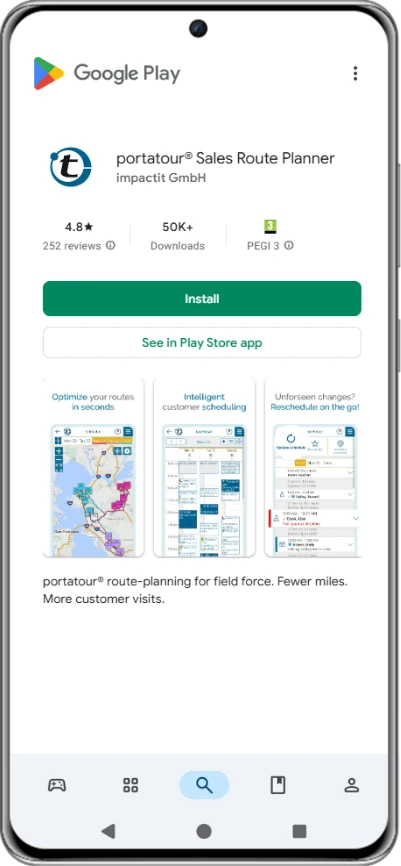
How to install the portatour® App on your Android device:

  1. Open the Google Play Store on your Android device or alternatively open this link to the portatour® App in the Play Store to skip steps 2 and 3.
  2. Tap the search field and enter “portatour”.
  3. Select the "portatour® Sales Route Planner” (publisher: impactit GmbH) from the search results.
  4. Tap the “Install” button.
  5. Wait until the download and installation are completed automatically.
  6. After installation, tap “Open” to launch the app.
  7. Follow the instructions within the app to sign in or set up your user account.
Google Play user
1
2
3
4
5

This app has made my life so much easier and better. It has good customer tracking and reporting. And the customer service support is amazingly awsome.

Google Play Store Logo
Ralf Kron
1
2
3
4
5

Best route planning app I've ever used!

Google Play Store Logo
Google Play user
1
2
3
4
5

Very satisfied, can recommend this app for every field service

Google Play Store Logo
Murray Godden
1
2
3
4
5

The best system Sales and Marketing could ever purchase for hitting those execution goals, been using it for over 6yrs and would be totally lost with out it.

Google Play Store Logo
Clint Mallum
1
2
3
4
5

This is an amazing appication but it's a bit costly.

Google Play Store Logo
beren brechtel
1
2
3
4
5

Pretty great hoping they offer some discounts because it is a bit pricey but the product is excellent mabye just a little less off the monthly bill.

Google Play Store Logo
Julien Buffetrille
1
2
3
4
5

Really powerful application! Everything is configurable, customer support is assured and nothing can escape your notice. Your customers will thank you! Save time on the road thanks to intelligent route calculation! Well done !

Google Play Store Logo
Adrian von Gunten
1
2
3
4
5

Great program, use it briefly for Corona-related delivery services in dozens of towns. I was able to do more with the trial version. Too expensive in the short term, probably ok in the long term.

Google Play Store Logo
Alberto Abbiati
1
2
3
4
5

Excellent, intuitive and very practical.

Google Play Store Logo
Alberto Bertamino
1
2
3
4
5

unique

Google Play Store Logo
Maik Donner
1
2
3
4
5

I've been using it for years and don't want to be without it anymore

Google Play Store Logo
judith bonnemaison
1
2
3
4
5

Really practical. I'm in the trial version but I will definitely buy the full version

Google Play Store Logo
Philippe SAUNIER
1
2
3
4
5

Just awesome ! Time saving, savings, optimization, efficiency, performance... No hassle. The only downside is the cost but after all it's money.

Google Play Store Logo
Carsten Conrad
1
2
3
4
5

Great software, you just need more time to test it. Or you have top customer data from the start...

Google Play Store Logo
Tobias Grasmeier
1
2
3
4
5

Excellent service, we've been using it for years

Google Play Store Logo
Instalador Sur 2
1
2
3
4
5

Very good app! 100% recommended.

Google Play Store Logo
Giovanni Casciello
1
2
3
4
5

Practically perfect application. 🔝👍

Google Play Store Logo
Snap-on Tools Ingo Schmidt
1
2
3
4
5

I'm totally satisfied

Google Play Store Logo
Cyril VIEILLY
1
2
3
4
5

the tool is extremely effective, as are those who ensure its marketing and user monitoring! the interface and functionalities have been designed pragmatically and the settings allow you to organize your time according to all commercial priorities and logistical constraints! special mention to P.

Google Play Store Logo
Marvin Heiß
1
2
3
4
5

Very easy to handle

Google Play Store Logo
Steffen Ohlendorf
1
2
3
4
5

Top.

Google Play Store Logo
Frank Burek
1
2
3
4
5

Relaxed route planning!

Google Play Store Logo
Steffen Lis
1
2
3
4
5

It makes work enormously easier. The route is planned super quickly. You can create reports and tasks.

Google Play Store Logo
Google Play user
1
2
3
4
5

perfect for field service

Google Play Store Logo
Google Play user
1
2
3
4
5

Help me organize my week! Excellent tool!

Google Play Store Logo
Google Play user
1
2
3
4
5

Excellent tool helping to maximise customer contact time.

Google Play Store Logo
Google Play user
1
2
3
4
5

"Very satisfied
I can recommend this app to any field service"

Google Play Store Logo
Google Play user
1
2
3
4
5

Nothing to say, complete top

Google Play Store Logo
Google Play user
1
2
3
4
5

Great app for reps

Google Play Store Logo
Google Play user
1
2
3
4
5

Works very well!

Google Play Store Logo
Google Play user
1
2
3
4
5

Top Service

Google Play Store Logo
Google Play user
1
2
3
4
5

Does what I want. Excellent

Google Play Store Logo
Google Play user
1
2
3
4
5

Great app for field sales force

Google Play Store Logo
Google Play user
1
2
3
4
5

Very good app

Google Play Store Logo
Google Play user
1
2
3
4
5

"Route planning
It's a great program that provides me with excellent support in the field."

Google Play Store Logo
Google Play user
1
2
3
4
5

Great App!!!!

Google Play Store Logo
Google Play user
1
2
3
4
5

Extremely useful, ergonomic and complete.

Google Play Store Logo
Google Play user
1
2
3
4
5

One of the best apps of its kind! Many thanks to the developers, it helps me a lot professionally!!

Google Play Store Logo
Google Play user
1
2
3
4
5

So far so good excellent customer service

Google Play Store Logo
Google Play user
1
2
3
4
5

great program for route planning

Google Play Store Logo

Alternatively, you can also skip the portatour® App download and use the web app. The route planning functionality is identical, only the upload of contacts from the Android address book is not supported in the web app, but only the upload of contacts via Excel, CSV or one of the integrations.


portatour® iOS App

portatour® iPhone und iOS App

The portatour® App is currently not available for download in the App Store. However, you can use the application without restrictions as a web app on your Apple mobile device. Simply open https://my.portatour.net/ in any browser on your iOS mobile device and get started. To add the portatour® icon to the home screen of your iPhone or iPad, proceed as follows:

  1. Open your personal access link on your iPhone/iPad.
  2. Tap the share icon (top right on iPad, bottom center on iPhone).
  3. Select the “Add to Home Screen” option.
  4. Confirm creation of the shortcut with “Add”. The portatour® icon will now appear on your home screen.
  5. Open the shortcut, enter your password and keep “Stay signed in” activated. Then tap “Login”.
portatour® iPhone und iOS App

FAQs about the portatour® app

Which devices can I use the portatour® App on?

You can use portatour® both on desktop and on any mobile device. The web app has a responsive design and automatically adapts to your mobile device. Simply open any internet browser and access your personal access link. In addition, the portatour® Route Planning App is available for Android devices as a download from the Google Play Store.

Does the web app differ from the Android app?

No. Both the Android app and the web app offer the full feature set: automatic route planning, dynamic territory planning, CRM integration and much more. The only difference lies in the way they are used: the Android app is downloaded and installed via the Google Play Store and can access contacts from the Android address book, while the portatour® web app can be used platform-independently in the browser.

Does the portatour® app also work offline?

Yes. Thanks to our offline mode, you can also use the portatour® Route Planner without an internet connection. When internet access is active, all necessary data is cached on your mobile device so that it can also be used offline if this should ever become necessary. You can find all information about the offline use of portatour® on the linked page.

Is the portatour® app download free of charge?

Yes, the download of the portatour® app from the Google Play Store is free of charge. Afterwards, you can test the Route Planner free of charge for 30 days.

In which languages is the portatour® app available?

You can use the portatour® app in German, English, Spanish, French, Italian or Portuguese.

Is my data secure?

Yes, portatour® places the highest value on data protection and data security. The servers are 100% owned by portatour® and are located in a secure data center in Vienna. No third-party cloud services are used. Proof of this is our certification according to the internationally recognized ISO 27001 standard. Here you can find all information regarding data security at portatour®.


Start now!

And convince yourself of our solutions for your field sales force.


Contact us

How can we help you?

Available by phone from Mon-Fri, 9-17h CET

I am already a user and need Support
Teamviewer: Remote access for portatour® Support

We look forward to the conversation

Federico Simion
Manuel Neumann
Katharina Klein
Amanda Auer
Daniel Sangster
Dennis Potempa
Magdalena Jovanovic
Rebecca Haim
Florian Wieshofer
Birkan Özkan
Jonas Kibitzki
Stefania Chirita
Franziska Bärenklau
Matthias Walch
Paul Laboureix
Christoph Aubault
Elisabetta Fossati